
Think about who does your repetitive work today. Employees are expensive, need training, and leave. VAs are cheaper but slow, inconsistent, and you still have to manage them. And if it's you, every hour spent answering leads, chasing follow-ups and updating the CRM is an hour you're not growing the business. Automations do that work 24/7, never quit, and cost a fraction of a salary. This guide shows you how to build them yourself, step by step.
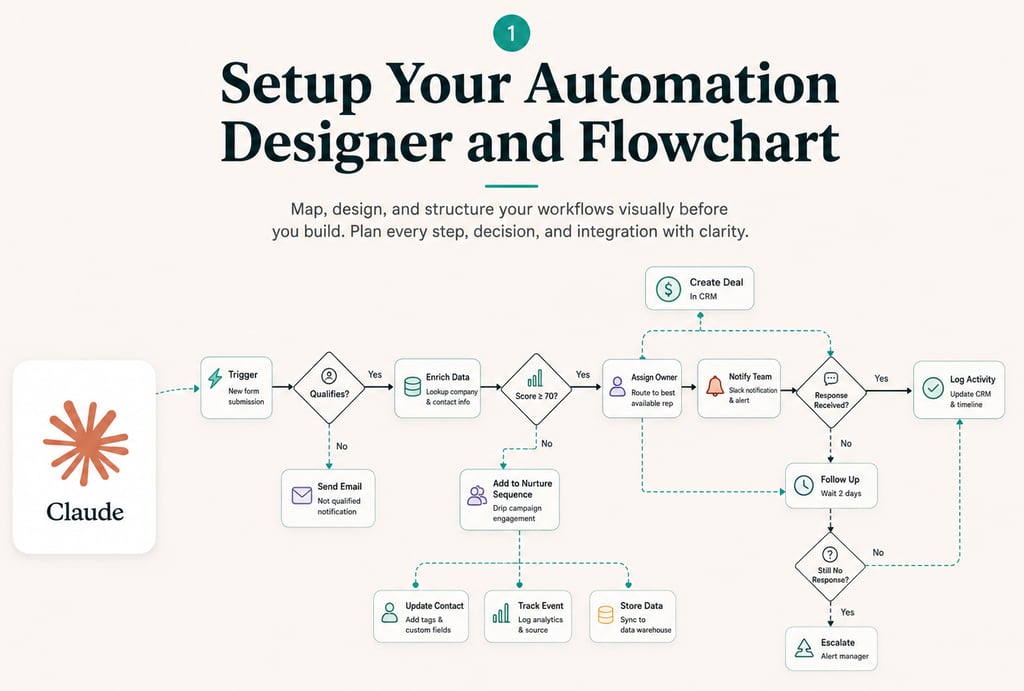
The first thing you need to build is your Automation Designer with Claude Code. It will:
Yes, it takes days to build this, but 100% worth it.
Any automation you build will need a CRM. Don't worry, even a spreadsheet counts. Before you automate anything, clean it up: one place for every lead, consistent fields, no duplicates. Your automations are only as reliable as the data they run on.
This is the part almost everyone gets wrong, because holding your data and running your sales process are two different jobs. Start here with the first one. Everybody climbs the same first two rungs, then it splits depending on what you need
Excel or anything like it. Perfectly fine for keeping track, with one hard limit: while the file lives on your laptop, nothing can automate it. That single fact is what pushes people to the next rung

The same spreadsheet, online. Free, and every automation tool on earth connects to it. If you do nothing else in this step, move your list here

Where we build most of what we deliver. A spreadsheet lets anyone type anything into any cell, which is exactly what breaks automations. Airtable makes each field hold one kind of thing, links records to each other, and gives every person the view they need without touching the data underneath

A spreadsheet built for millions of rows, for the point where Google Sheets stops opening the file at all. It stays a spreadsheet, so nobody has to learn anything new

For huge volumes, or when you are building actual software on top of your data, like a portal your clients log into. More power and no friendly grid to click around in, so this is a decision you make with a developer

Files are a separate problem, and they do not go in your CRM. Contracts, photos, scans and documents belong in Google Drive or anything like it, with a link from the record that points at them. Loading heavy files into the CRM itself is the fastest way to make it slow and expensive
Everything above HOLDS your data. A CRM RUNS your process on top of it: stages a lead moves through, whose turn it is, what happens next and when. Some of these do both, which is why the two get confused
Storage and CRM in one, once you shape it. Our default for client systems, because it bends to how you already work instead of the other way round

Very popular with agencies. Bundles the pipeline with calls, texts, funnels and campaigns, so it replaces several subscriptions at once

The best known one, and genuinely good. Generous to start with, then the price climbs quickly as you add people and features

The enterprise standard. It can do almost anything, and it expects someone whose actual job is looking after it. Overkill for most companies our size

Sales first and deliberately simple. A good fit if all you want is a pipeline your team will actually keep up to date

Work management first, CRM second. Worth it when the same team runs its projects and its pipeline in the same place
If you are choosing today and you are not sure, put your records in Airtable and your files in Drive. It is the combination we set up most often, it costs very little, and nothing you build on it has to be thrown away when you grow
With your context and CRM ready, have your Automation Designer build the automation layer: the flows that respond to leads, run follow-ups, and move records through your pipeline automatically. Start with the task that eats most of your day, get it running, then add the next one.
There are many ways to run automations. Which one fits you depends on the volume and the complexity of what you will run

The simplest place to start. Visual, forgiving, and you can have your first automation running today. Best while you are still working out what you actually need

Reaches more apps than anything else, so it gets to tools the others cannot. Keep an eye on the bill as you grow, because it charges per task and that is what eventually pushes people off it

Where we build most of what we deliver. Worth the jump once you are running more than 10 automations, or when a single flow gets genuinely complex. Much cheaper at volume and far more flexible, in exchange for being more technical


For flows with real logic inside them, or when you want to own the source outright. You get a full history of every change, real tests, and any developer can read exactly what happens. The honest trade: there is no screen your staff can click to reconnect something, so a break becomes a developer's job
TypeScript is the default. Almost every tool you connect to has a ready-made library for it, so there is less to write and less to break
Python for data-heavy work: analysis, scraping, anything statistical

A private GitHub repository, one per company. Every change is recorded and reversible, and you can hand the whole thing to any developer whenever you want
No key, password or client data ever goes in the repository itself. Only the instructions live there

Render from $7 a month. It deploys itself every time the code changes, which is the simplest setup and the one to start with

Hetzner for a few dollars a month, one server running everything. Cheaper once you have enough automations to justify looking after it yourself

Bitwarden sends a key as a one-time link that expires and deletes itself. Never by email or chat, where it would sit in both mailboxes forever
Keys are then stored in your host's encrypted settings, never inside the code. For anything Google, a service account beats a normal login because it never needs reconnecting
Some tools have no API, so your automation has to click through the website like a human does. These are your three options:
| Feature | OpenClaw Agents | VAs (Human Assistants) | Skyvern |
|---|---|---|---|
| UI Change Resilience | Medium to High | High | Low |
| 24/7 Execution | ✅ Yes | ❌ No | ✅ Yes |
| Setup Speed | Medium | Fast | Slow |
| Scalability | Medium | Low | High |
| Consistency | Medium | Low | High |
| Detection Risk | Low to Medium | Low | Medium to High |
See exactly what we build and what it costs, or send us a message and we will estimate the ROI for your flows.